Keep your services healthy with circuit-breaker

The circuit-breaker is not that much different from Stop Loss in stock investment.

When your Titanic has leaking holes, the entire ship will sink if you don’t have another protection layer to isolate those leaking holes.

The essence of Circuit-breaker is to isolate unavailable dependent services to avoid cascaded service unavailability.

Typical issues caused by bad dependent services

  1. Exhausting resource because of dependent service late response or no response for a long period.
    • Ever request will open certain resource in a server. The threads will be locked until the request is timeout. In high concurrent scenario, it could exhaust the server’s resource.
    • If microservice applications run on containers, this could lead to the container got killed because run out of memory.
  2. Causing MQ unavailability. If two services are interacted with each other using ActiveMQ. Service A keeps sending message to the ActiveMQ while Service B is unavailable. This could result in the ActiveMQ runs out of storage such as too much message in the DLQ. And finally, the MQ becomes unavailable.

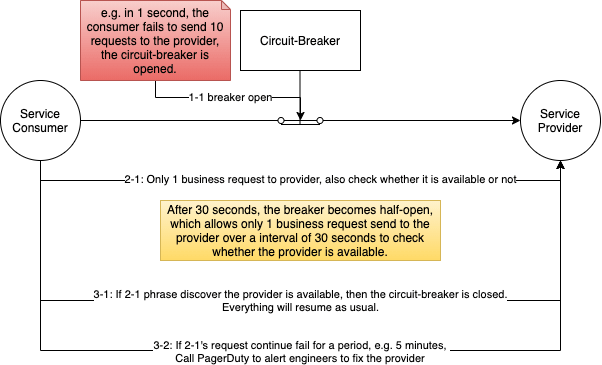
The Circuit-Breaker Design

Other implementations, frameworks, design and approaches will be provided when I have time.

Dealing Distributed Transactions with 2PC, 3PC, Local Transaction Table with MQs

In a monolithic system, transactions can be managed by the DB, e.g. lock, redo log, undo log, DB’s ACID characteristics, and etc. When it comes to distributed systems, multiple systems involved, the situation becomes more complicated compared to the scenario in a monolithic system.

I am going to start with the some theories and architecture design to solve Distributed Transaction requirements. When I have time in the future, I will write some posts about implementation details, high concurrent and low latency approaches.

This blog will be structured with the following sections:

  1. Key takeaway architecture design mentality
  2. Terminology
  3. 2PC—Two-Phase Commit
  4. 3PC—Three-Phase Commit
  5. Eventual Consistency with Message Queue, Schedule Tasks and Local Transaction Table

Key takeaway architecture design mindset

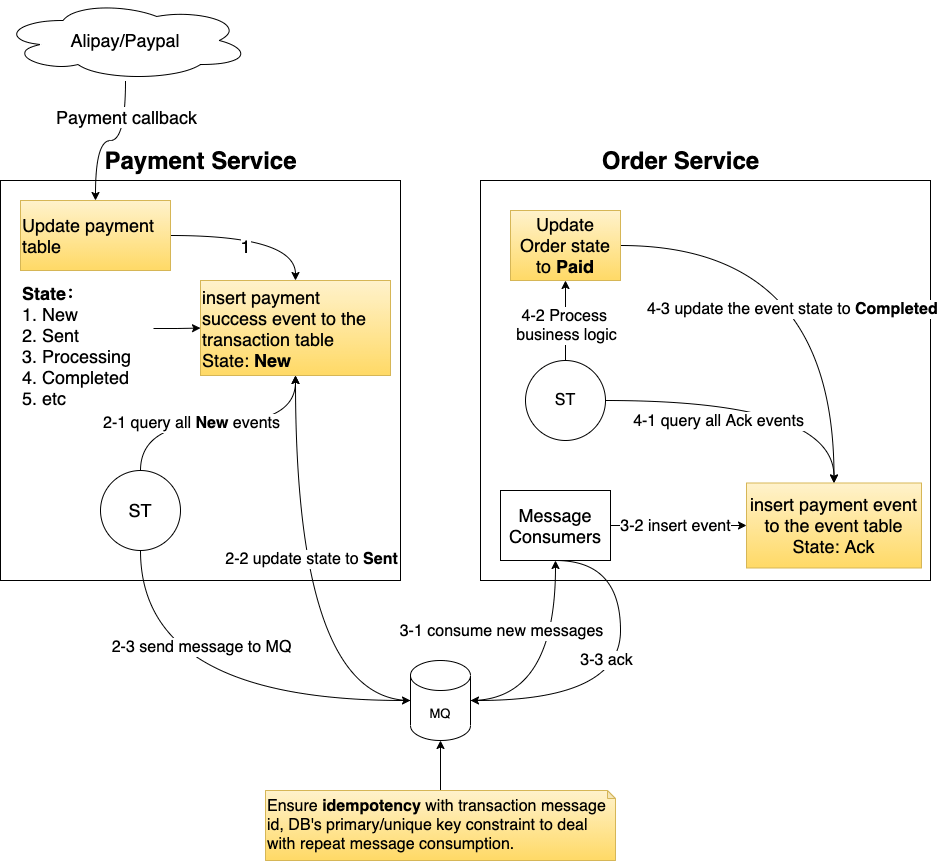
You can’t rollback a task once it is committed/consumed in a third party systems so writing to local DB before sending message to MQ is the key.

Terminology

TM = Transaction Manager, also called coordinator

RM = Resource Manager, also called cohort, you can take it as services such as payment service, order service

2PC — Two-Phase Commit

2PC is widely used in many organisations.

Only TM has timeout. TM timeout means after a timeout period the TM has receive response from a specific RM.

Work Flow

  1. TM sends commit requests, i.e. pre commit requests, to all involved RMs. During this phase, RMs that receive the requests will start the transaction but not commit it. Resource is locked once the transaction is started on the RMs.
    • It blocks other requests that require the access to the locked resource.
  2. It will have 2 scenarios on the second phases
    • If all RMs success on the previous phase, then TM sends commit instruction to all RMs;
    • If one or more of the RMs are failed on the first phase, no matter due to network failure, pre commit failure, TM timeout, or other errors, then TM will send out abort instructions to all RMs.

Pros

Better commit success rate compared to a service directly calling other parties. This is because the pre-commit phase already verify that it is able to commit before the TM sending out commit request. If the pre-commit success, the server and network are most likely in a good state.

Cons

  1. Single node failure. The entire transaction workflow is managed by the TM. If the TM down during the process, the transaction is broken.
  2. Blocking the distributed system. Resource is locked between phase one and phase two. If there are network issues or server issues, e.g. STW, it could block other requests to access the same resource for long.
  3. Data inconsistent. If in the 2 phase, the TM has sent commit request to RM1 and RM1 has committed, at the same time both TM and RM1 down before RM2 receive the commit request from the TM, then there will be data inconsistent because RM1 committed while RM2 hasn’t. Also the standby instance of TM might not has yet synchronised the transaction state from the Pre-Active TM.

3PC — Three-Phase Commit

3PC has relatively higher transaction success rate and lower resource lock time compared to 2PC.

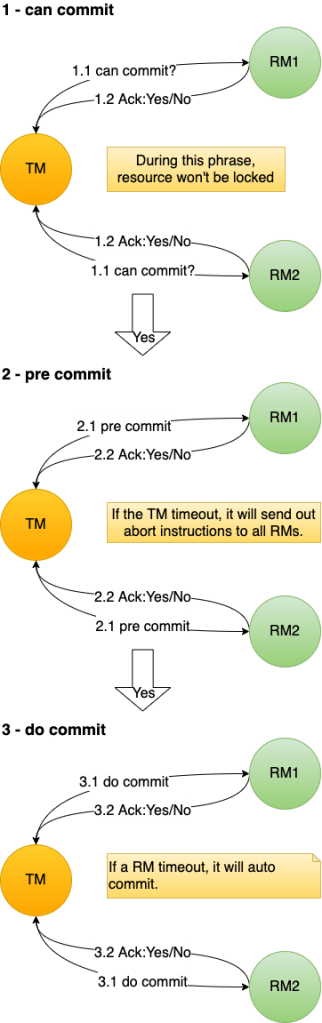
In 3PC, both TM and RM have timeout.

Work Flow

Key changes

  1. In the 2nd phase, if the TM hasn’t got the response from certain RMs, then it will assume those RMs are failed to pre-commit. Then the TM will send out abort instructions to all RMs.
  2. In the 3rd phase, if RMs are timeout, then they will continue to commit.

Pros

  1. Higher Transaction success rate and lower resource lock time because the can-commit phase tests the network and servers’ state is in good condition.
  2. Both TM and RM have timeout mechanism. This reduces the probability of data inconsistent.

Cons

  1. It hasn’t solved all the issues of 2PC but rather just mitigate their severity.
  2. Data inconsistent. If the TM fail and some of the RMs has pre-committed while others are not, then there will be data inconsistent.

Compensation Mechanisms

Here are the typical ways of applying compensation to deal with the data inconsistent issues of 2PC and 3PC.

  1. Human intervention compensation
  2. Schedule tasks compensation
  3. Cron jobs compensation

Eventual Consistency with Message Queue, Schedule Tasks and Local Transaction Table

This approach is suitable for those system without high concurrent requests. It’s enough for many small to medium businesses or internal systems. Both the schedule service and MySQL are the bottlenecks of this system. Frequently read/write would place overloaded stress on MySQL DBs. Scaling is also an issue because here services are tightly coupled with the db.

Work Flow

Both phase 1 and 2 are local DB transaction execution.

You can’t rollback a task once it is committed/consumed in a third party systems so writing to local DB before sending message to MQ is the key.

Therefore, we first write to local DB before sending message to MQ.

  1. Anything fail before sending to the MQ won’t impact other services.
  2. If the MQ is down
    • If the MQ hasn’t sent out message to the order service, then it’s fine because when its standby instance take place, it will send out the message.
    • If the MQ has sent out the message to the order service, we will have mechanism described in the above diagram to ensure Idempotency so no need to worry about repeat consumption issues.

CAP—Simple explanation of Consistency, Availability and Partition tolerance

If you want a highly carrier-oriented husband, he most likely couldn’t pay much attention and time to his family. If you drive a car with complex high techs, high performance, and luxury, it most likely won’t come with reliability. There are many imperfections in many aspects of the real world. Like these imperfections, the CAP theorem is the theory of you can’t have all.

Despite many imperfections, it boils down to one question, what are the most important factors that we want the most.

I am going to explain the CAP theorem with simple language with real world examples.

The C — Consistency

The consistency means in the same software system having the same state of data in different storage spaces at the same time.

Once you commit it, it should have the same result when you query later no matter when and where you check it.

Take the ATM machine as an example, if you withdrew $1,000,000 from your account, once the transaction has done, no matter when and where you check it, there must be $1,000,000 amount deduction from your account balancer. There’s no tolerance for any delay of account balance synchronisation in this scenario, otherwise, you can earn $1,000,000 easily by having two people in different locations with the distance that is long enough for the system delay to withdraw $1,000,000 at the same time even your account doesn’t have $2,000,000.

The A — Availability

The availability means at the same time the service is available.

The availability refers to whether services are available, in the other word, whether a service can response in a reasonable manner with reasonable response.

If we initial a phone call to a friend, and the call is successfully initiated. However, the delay of our voice to the other party is 500 years, then the service is still unavailable. We would simply hang up the call.

The P — Partition Tolerance

The partition means in different storage spaces.

Partitions tolerance means the distributed system still provide services even part of the system is unavailable due to some issues such as network unavailability.

Take a news system as an example,

As can be seen from the above diagram, the Brisbane server is still able to provide service for Users with cached/stored relatively old data in its data source. This is an example of the AP model.

The Conflicts

CP(Consistency and Partition Tolerance)

To have same state of data in different storage spaces, it must be at the different time.

AP(Availability and Partition Tolerance)

At any time, to be able to get data from storage in any space, there must be instances that the data is inconsistent.

CA(Consistency and Availability)

At any time, to be able to get the consistent data from any storage space, then there must be only 1 storage space.

For the current human technology, it is impossible to achieve CAP at the same time.

Usage

Strong consistency scenarios: Bank transaction

To be strong consistency, we need synchronisation when update occur, and the performance and availability will severely impact.

High availability scenarios: articles, news websites.

For high availability scenarios, we can apply eventually consistency model. Users might get some old data for a certain period, but eventually they will have the new data.

Applications

Zookeeper(ZK)

ZK applies the CP model. At any time, we can have consistent data results. It has network partition tolerance but doesn’t guarantee the availability of services. For example, if the ZK cluster is busy with elections or half of the machines are unavailable in the cluster, then the service is unavailable.

Eureka

Eureka applies the AP model. It does not guarantee the consistency of data. Further detail please refer to my previous post: Spring Cloud Netflix Eureka for microservice registration and discovery

GCs of JVM tuning: PS+PO VS CMS VS G1

When it comes to GCs of JVM tuning, the following important concepts have to be elaborated:

STW(Stop the world)

The GC pause in which all business threads stop to reach to the safe point.

Take dining in a restaurant as an example, the waiters need to wait till customers finish certain meals before collecting those garbage, otherwise, it could mess up things. It’s same here for GC. At certain phrases of garbage collection, we will need the safe point, like customers stop dining, to collect garbage.

Response time

The shorter the STW, the better the response time. Websites and APIs normally need to optimise the response time. CMS and G1 are the GCs for response time first application.

Throughput

throughput = business logic execution time / (business logic execution time + GC time)

Data mining, compute-intensive applications and schedule tasks modules are typical examples of throughput first application. Parallel Scavenge and Parallel Old are for throughput focus application. It has approximately 10-15% higher throughput compared to G1 in certain scenarios.

Before getting in deep of these three typical GCs, let’s start with some basic important concepts.

Reference count and Root-finding algorithms

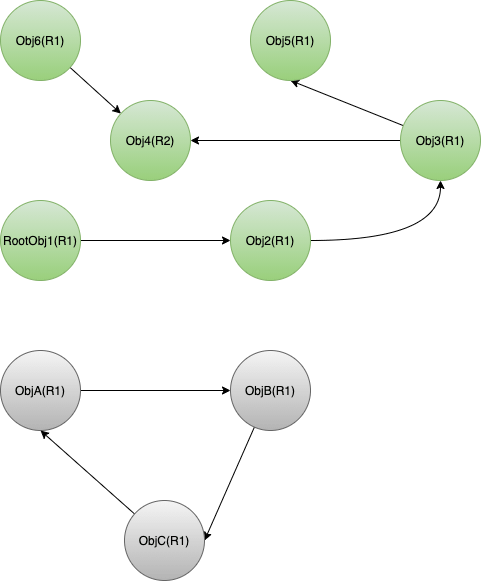
Reference count(RC) use the number of reference that objects have to determine whether to collect them. The problem is circular reference.

From the above diagram, ObjA, ObjB and ObjC are all have 1 reference count. However, they are not live objects and supposed to be collected. This is the circular reference problem of RC. The GC won’t collect them if it is based upon the condition of only collect if reference count equals to 0.

Root-finding

This algorithm starts from the roots of the application program.

  • GC Roots include
  • Stack Local variables, run-time methods variables
  • static variables and constants
  • class objects referenced by run-time constant pool
  • objects referred by JNI
  • Objects used as synchronized monitor.

From these root, the algorithm will find out all reachable objects, and these objects are uncollectible objects.

Three common GC algorithms

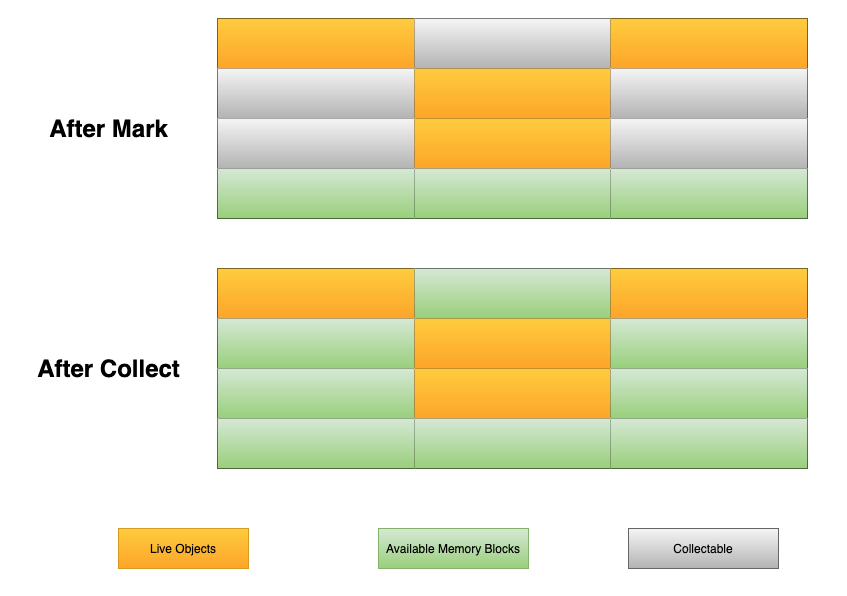
Mark-Sweep

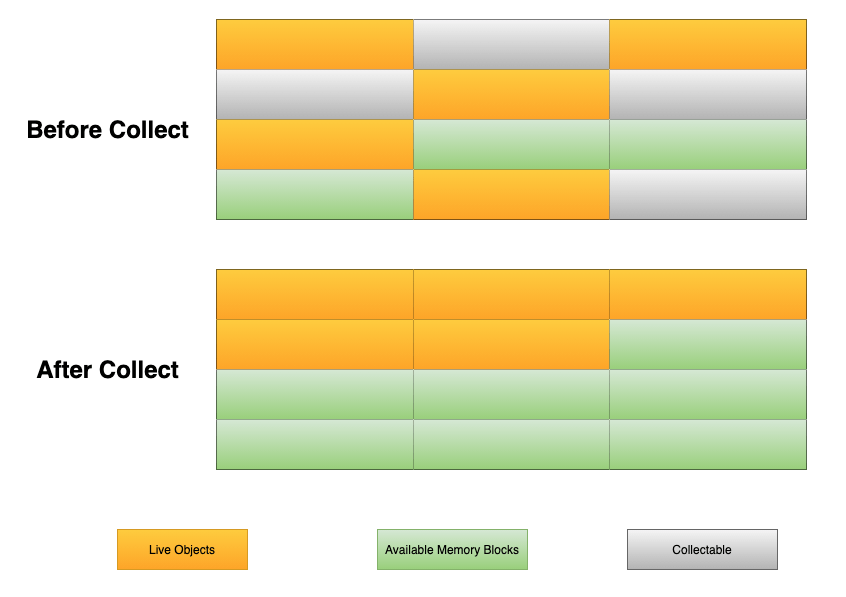
The mark-sweep algorithm marks and collects those collectable blocks.

Pros:

  1. It is effective when there are many live objects and small amount of collectable objects;
  2. It is suitable for tenured region.
  3. CMS uses this algorithm.

Cons:

  1. It is relatively low efficiency as it will need to scan twice for the entire region.
    1. First scan to find out those live objects;
    2. Second scan to find those collectable objects for collection.
  2. It will generate memory fragments.
  3. It is not suitable for Eden region as there are small amount of live objects.

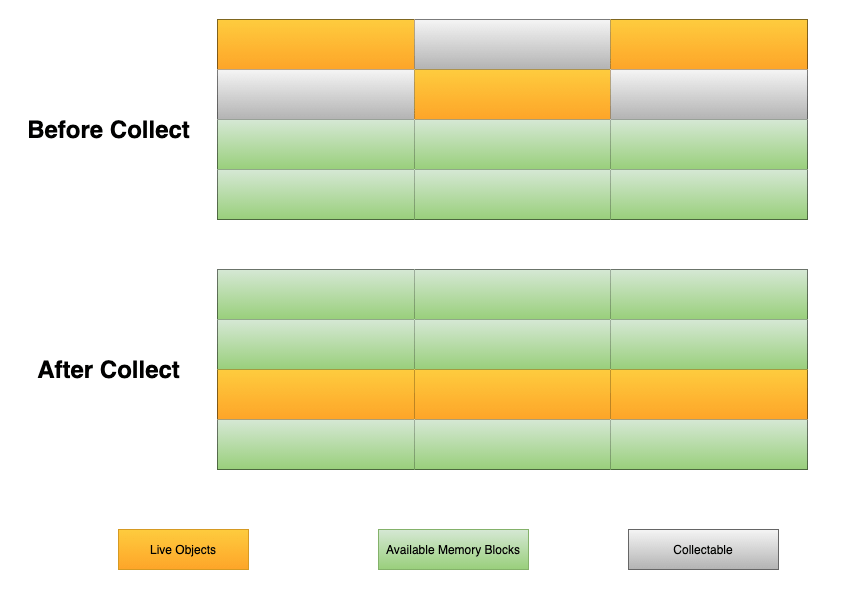
Copy

The copy algorithm divides the target region memory into two part. It copies all live objects to the second part and clean up the first part.

Pros:

  1. It does not generate memory fragments.
  2. It only need to scan once, relatively high efficiency for small amount of live objects.
  3. It is suitable for Eden region.

Cons:

  1. It wastes half of the region memory.
  2. It will need to adjust object references because it moves objects around.

Mark-Compact

The mark-compact algorithm marks and moves all live objects to the beginning of the region.

Pros:

  1. It won’t generate memory fragments.
  2. It is good for objects’ allocation.
  3. It won’t cause the waste of memory.

Cons:

  1. It is relatively low performance, because it needs to scan twice and compacts objects.
  2. Synchronisation is required when multi threads invoked.

Garbage Collectors

Parallel Scavenge and Parallel Old

Parallel Scavenge(PS) is a stop-the-world, copying collector using multiple GC threads.

Parallel Old(PO) is a stop-the-world, compacting collector using multiple GC threads.

They work together to deal with young and old generation respectively.

This combination is good for throughput-prioritised applications.

Common Parameters of PS + PO:

-XX:SurvivorRatio
-XX:PreTenureSizeThreshold
-XX:MaxTenuringThreshold (in JDK 8, the maximum value is 15 because only 4 bits to store this value in class file)
-XX:TargetSurvivorRatio (this is the parameter that actually determines whether objects should promoted to the tenured region or not.)
-XX:+ParallelGCThreads
-XX:+UseAdaptiveSizePolicy
In-depth understanding of XX:TargetSurvivorRatio
uint ageTable::compute_tenuring_threshold(size_t survivor_capacity) {
  size_t desired_survivor_size = (size_t)((((double) survivor_capacity)*TargetSurvivorRatio)/100);
  size_t total = 0;
  uint age = 1;
  assert(sizes[0] == 0, "no objects with age zero should be recorded");
  while (age < table_size) {
    total += sizes[age];
    // check if including objects of age 'age' made us pass the desired
    // size, if so 'age' is the new threshold
    if (total > desired_survivor_size) break;
    age++;
  }
  uint result = age < MaxTenuringThreshold ? age : MaxTenuringThreshold;

From the above C++ code snippet, we can see that the TargetSurvivorRatio flag is the actually parameter that determines whether objects should promoted to the tenured region or not. Basically, it sums up total size between 0 to specific age, that is just understand the ratio threshold and other objects with age above the threshold will be promoted.

ParNew and Concurrent Mark Sweep(CMS)

ParNew is kinda like the new version of PS with extra feature and enhancement. Its enhancement allows it to work with CMS. For example, it satisfies the synchronisation need during the concurrent phases of CMS.

CMS is a revolutionary GC designed to target small amount memory (from hundreds of MB to several GB) with low pause. It realises the concurrent operation of GC and business threads.

ParNew + CMS + Serial Old are worked as a combination.

Card Table

When YGC occurs, scanning the all objects in the tenured region is unnecessary overhead. Therefore, CMS has a the card table mechanism to save the unnecessary overhead.

It a divide and conquer approach. The card table uses cards to mark chunks of the old region. Each card contains multiple objects. When the application starts, the card table works with write barrier to monitor those cross-region reference. The write barrier is not memory fence. It works like AOP in spring. When assignment happens to a reference, it will change the card table, e.g. CARD_TABLE[this address >> 9] = 0. Those cards with cross-region references are marked as dirty so that during YGC, the GC only need to scan those dirty cards rather than all objects in the old region.

Tri-Color Marking Algorithm

Black, grey and white colours are used for marking objects.

Objects marked with black colour means itself and all objects it refer to have been scanned already.

Objects marked with grey colour means only itself have been scanned but not those objects it refer to.

Objects marked with white colour means either they have been scanned yet or there are no references for them. Therefore, at the end of the scan and mark process, GC can collect these white objects.

CMS has the incremental update mechanism. During concurrent mark phrase, if there are changes on the reference associated with black objects, these black objects will be marked as grey and rescan again.

6 phrases of CMS
1. CMS Initial Mark (STW phrase)

The GC only marks root objects and old region objects referred by young generation objects.

2. CMS Concurrent Mark

GC threads work concurrently with business logic threads. Clients would feel a bit slower on request processing but there is no STW here.

Around 80% of the CMS FGC time happens here.

3. CMS Concurrent Preclean

During the second phrase(CMS Concurrent Mark), the business threads are also working. There could be promotions from young generation, new allocations or some modifications that happened on some objects references, and the cards associated with these objects will be marked as dirty.

The concurrent preclean phrase will rescan these objects concurrently, update obsoleted reference information and clean up cards’ dirty state.

This reduces the workload of the CMS Final Remark phrase so that the STW pause can be shorter.

CMS Concurrent Abortable Preclean

The abortable preclean not only cleans up cards, but also manages the start point of next final remark phrase. The ideal start point of the CMS Final Remark phrase is the 50% occupancy of young generation (the middle point between the last YGC’s end time and the next YGC’s start time).

4. CMS Final Remark (STW phrase)

During previous phrases, there could be newly generated garbage objects or some no reference object regained references again. Therefore in this phrase, there will be a STW to reach to the safe point and remark.

5. CMS Concurrent Sweep

The GC cleans up those garbage objects in this phrase. As it is a concurrent phrase, the business threads would generate some new garbage during the sweep process. These newly generated garbage is called floating garbage.

As it uses sweep algorithm, memory fragments would occur.

6. CMS Concurrent Reset

Reset the CMS internal data structure and prepare for the next CMS.

Common Parameters of CMS:

// UseConcurrentMarkSweepGC = ParNew + CMS + Serial Old
-XX:+UseConcMarkSweepGC
-XX:ParallelCMSThreads

-XX:CMSInitiatingOccupancyFraction
// UseCMSInitiatingOccupancyOnly works with CMSInitiatingOccupancyFraction
-XX:+UseCMSInitiatingOccupancyOnly

// CMSIncrementalMode would disable the effect of CMSInitiatingOccupancyFraction 
// stopping the concurrent phase to yield back the processor to the application
// it would cause more frequent CMS FGC
-XX:+CMSIncrementalMode

// default to be 0
-XX:CMSFullGCsBeforeCompaction
// Enable by default. If we don't set the value for CMSFullGCsBeforeCompaction, then every CMS FGC will cause compact, and this affects the performance of the system.
-XX:+UseCMSCompactAtFullCollection

-XX:+CMSClassUnloadingEnabled
-XX:GCTimeRatio

// suggested pause time, the GC will try its best to achieve this goal(e.g. reduce the young generation's size).
-XX:MaxGCPauseMillis
G1 Garbage-First Garbage Collector

G1 is the new super star in the JVM GC world in JDK 9.

In JDK 9, CMS is deprecated and it is removed in JDK 14.

The G1 GC emerged on JDK 7, evolved mature on JDK 8 and became the default GC on JDK 9.

It is especially good for response-time-prioritized application with relatively large memory (8G – 100+G).

The problem of large memory

When memory in scale, the CMS is no longer an idea choice due to its memory model design. Scanning the all objects in the old region can be time-consuming for CMS if you have 16-100+G memory.

G1’s solution

It is a divide and conquer approach.

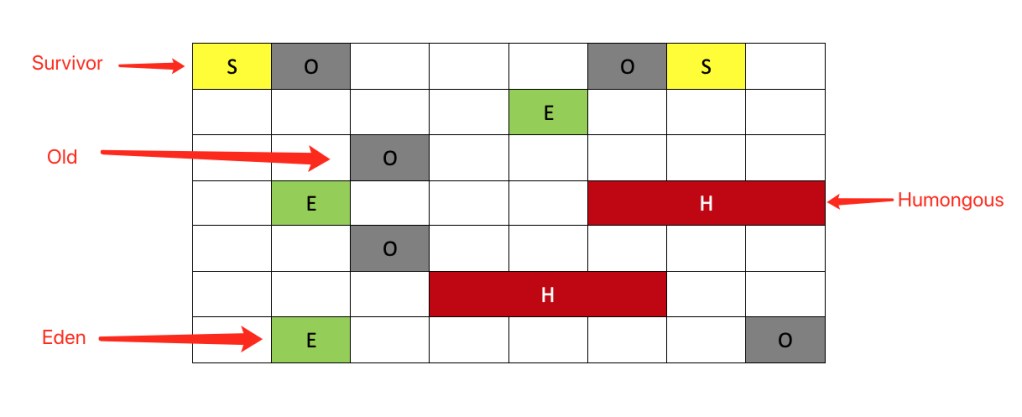
The G1 GC logically divides the memory into generations but not physically. Once a region is recycle, it can be used by other generation. For example, a chunk of memory that is allocated for Eden can be allocated as Old after recycle.

Garbage first: it prioritises the region with the most garbage that is needed for GC so that it can spend relatively small amount of time to collect them. It uses concurrent and parallel phrases to achieve its target pause time and maintain decent throughput.

It’s also a compacting GC, compacting live objects from one region to another.

CSet(Collection Set)

CSet records a set of collectable regions. It is the collection of the regions with the most recyclable garbage (G1 prioritises cards with the most collectable garbage, so these regions are put into one set to facilitate the GC)

RSet(Remembered Set)

RSet records references from other regions to the current region.

With RSet’s help, the GC don’t have to scan the entire heap to know which objects refer to objects in the current region.

SATB (Snapshot-At-The-Beginning)

G1 pushes the disappeared references to the local stack, so as to ensure that the white objects are still be reachable by the GC
1. G1 uses SATB because there is RSET, which allows the GC to check if there are other objects referring to specific objects, so that the newly created reference black objects to white objects are still reachable by the GC.
2. Unlike CMS having to rescan all grey objects if there are references’ changes during concurrent phrase, G1 only need to scan those reference pushed into the local stack, resulting in performance improvement.

Please notice: RSet impacts reference assignment a bit because of the write barrier.

YGC

When there isn’t sufficient space to use in the Eden region, YGC occurs.

Mixed GC

Phrases of the mixed GC stage in G1 are kinda like the whole set of the CMS system. Both old region and young region will be collected. It follows the garbage first rule we mentioned before. We set the -XX:InitiatingHeapOccupancyPercent to trigger mixed GC to avoid failed evacuation caused FGC.

FGC

We must avoid to trigger the FGC. Before JDK 10, FGC in G1 is the single thread serial old. You can imagine how an old man clean up the entire CBD of a city. It’s time-consuming. Since JDK 10, the FGC for G1 is parallel, but we still need to avoid it.

How to avoid? set -XX:InitiatingHeapOccupancyPercent to trigger mixed GC eariler.

Common Parameters of G1:

-XX:+UseG1GC
// Do not set -Xmn for G1, because G1 will dynamically adjust the size of the Y region
// suggested pause, G1 will adjust the Young region size to achieve this value, default 200ms
-XX:MaxGCPauseMillis
-XX:GCPauseIntervalMillis

// region size, size of 2^x(x >= 0), e.g, 1, 2, 4, 8, 16, 32
// the bigger the size, the longer for garbage to live, the longer the GC time
-XX:G1HeapRegionSize

// the minimum percentage of heap size for the young generation
-XX:G1NewSizePercent
-XX:G1MaxNewSizePercent
-XX:GCTimeRatio
-XX:ConcGCThreads

-XX:InitiatingHeapOccupancyPercent

// Remove duplicate strings
-XX:+UseStringDeduplication

Common misunderstanding of Metaspace and its sin on killing containers

  • Why do docker containers get kill frequently with lower heap usage?
  • How does Compressed class space and Metaspace OOM occur?
  • Why do FGCs occur frequently during the early application start phase?
  • Do you really understand the -XX:MetaspaceSize parameter?

When it comes to JVM tuning and OOM trouble shooting, there are some common misunderstanding regarding Metaspace. This article will address these questions step by step.

What is Metaspace?

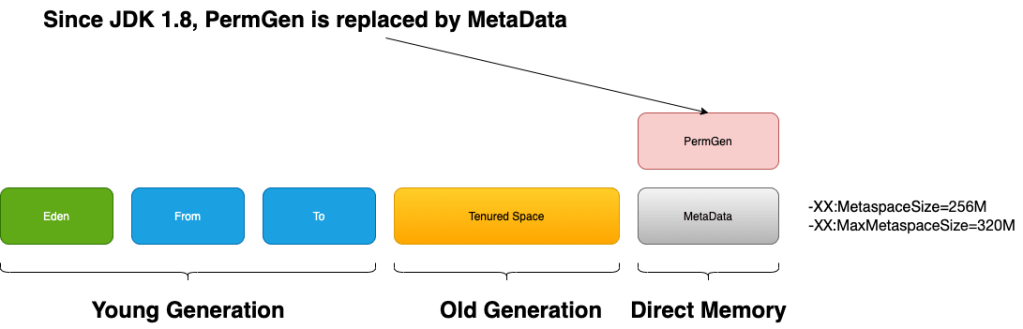
Metaspace in the JVM run-time data area is for storing classes’ information, using direct memory outside the heap.

Before JDK 8, it was the PermGen in the heap serves for the similar purpose. Since JDK 8, Metaspace replaces PermGen, and it lives outside the heap and uses direct memory.

String constants are stored in heap in JDK 8.

It has two parts: Klass Metaspace and Non-Klass Metaspace

Klass Metaspace

We can take klass as the internal run-time data structure of our Java class in JVM.

The -XX:CompressedClassSpaceSize is used to specify the max size of this region. The default value for this parameter is 1G. If the UseCompressedOops parameter is disabled, there is no Klass metaspace and its data will be stored on the Non-Klass Metaspace. If your -Xmx is bigger than 32G, UseCompressedOops is disabled by default.

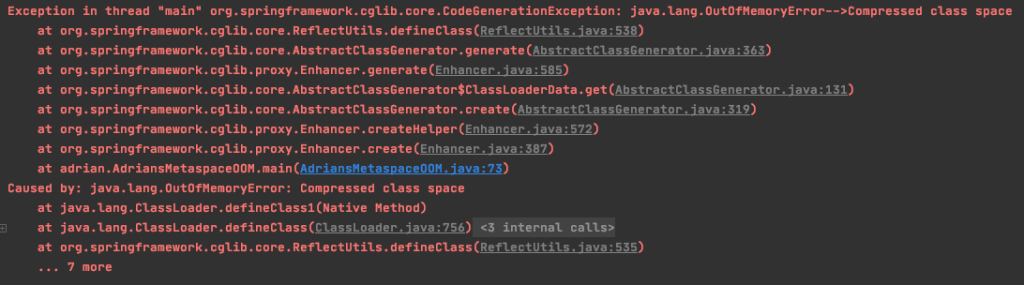
If the memory usage in this region reaches to the specified CompressedClassSpaceSize and the application still requires to allocate more memory, Full GC will occur. If the FGCs can’t release some memory for usage, then the JVM will complain java.lang.OutOfMemoryError: Compressed class space and application crash.

Non-Klass Metaspace

The Non-klass Metaspace stores klass-related metadata, such as method, constant pool, etc.

Why do docker containers get kill frequently with lower application heap usage?

One of the typical cause of this problem is the growth of metaspace.

As I mentioned above, the metaspace uses direct memory. If we haven’t specify the MaxMetaspaceSize flag, the metaspace size can grow till the physical memory size.

If your application code is not robust enough or uses some buggy third-party code, having a large amount of constant and using dynamic class loading, it would cause the overwhelming constant pool. Overtime, it could exhaust all your physical memory resulting in killing the docker container or killing other processes that running in the same production machine.

Solution: set -XX:MaxMetaspaceSize

With the MaxMetaspaceSize set, we have better resource isolation in production environment(at least in the direct memory aspect).

When the direct memory usage in metaspace reaches to the maximum value, if the FGCs can release some memory then your application can continue after certain STWs, if it can’t release some memory, then it will result in java.lang.OutOfMemoryError: Metaspace.

We can use -XX:+HeapDumpOnOutOfMemoryError to dump the heap for trouble shooting.

Even we have one application crash in the worst scenario, it is still better than killing other applications in the same machine.

Why do FGCs occur frequently during early application start phrase and how is it related to MetaspaceSize?

If we haven’t set the -XX:MetaspaceSize parameter, its default value is around 21M.

Some articles take this parameter as the size of the Metaspace, and this is wrong.

It is the metaspace’s initial high water mark(HWM).

The HWM of metaspace will shrink or grow according to the information collect by the VM. Internally, it is controlled by the capacity_until_GC in metaspace’s implementation.

For experiment, I wrote a small program with non-stop dynamic class loading starting with the following VM options(-Xms200M -Xmx200M -XX:+DisableExplicitGC -XX:+UseConcMarkSweepGC -XX:MaxMetaspaceSize=200M -XX:+PrintGCDetails -XX:+PrintGCTimeStamps)

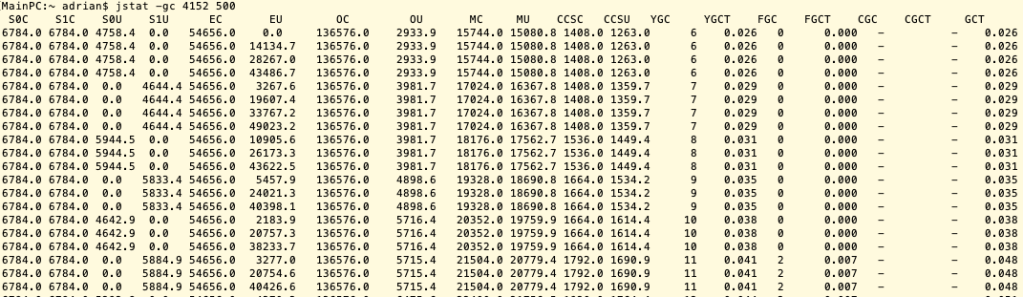
When the metaspace memory usage reaches to the HWM, it will cause FGC and the HWM will increase. Here are some of the GC data captured by jstat:

jstat -gc 4152 500

When the MU(Metaspace utilization) reached to around 21M, the CMS FGC was triggered.

When the MU reached to around 35M, the next CMS FGC was triggered.

Then the next CMS FGC happened at around 60M MU.

The next one occurred at around 100M MU.

Then around 170M MU

And then metaspace OOM

From the above experiment, it is obvious that the we will experience several FGCs for an application initially only needs around 200M MC(metaspace capacity). This is costly.

Improvement: set the initial HWM to a high value with -XX:MetaspaceSize

Should we set this value same as -XX:MaxMetaspaceSize?

Let’s take a look at the following experiment:

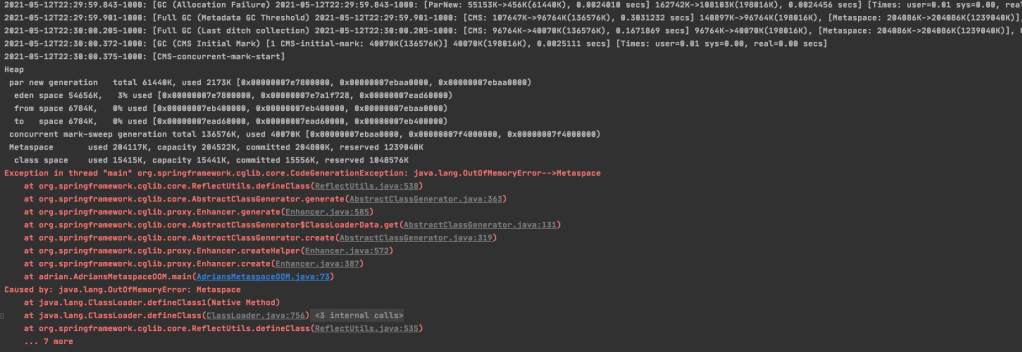
Experiment 1 Same MetaspaceSize and MaxMetaspaceSize with VM Option: -Xms15M -Xmx15M -XX:+DisableExplicitGC -XX:+UseConcMarkSweepGC -XX:MaxMetaspaceSize=10M -XX:MetaspaceSize=10M -XX:+PrintGCDetails -XX:+PrintGCDateStamps

The CMS FGC started but at the CMS-concurrent-mark phrase the application crash with OOM.

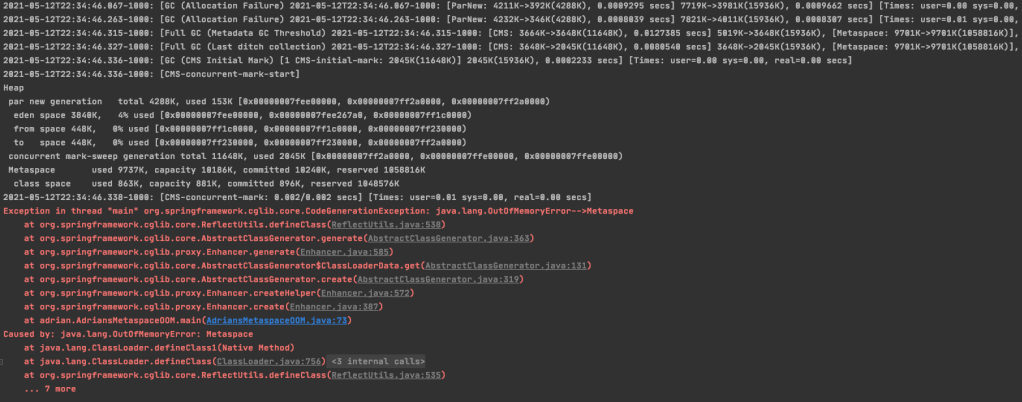
Experiment 2 Leave some room between MetaspaceSize and MaxMetaspaceSize with VM Option: -Xms15M -Xmx15M -XX:+DisableExplicitGC -XX:+UseConcMarkSweepGC -XX:MaxMetaspaceSize=12M -XX:MetaspaceSize=10M -XX:+PrintGCDetails -XX:+PrintGCDateStamps

From the above screenshot, we can see there’s one CMS FGC finished before the final application crash. The application crashed here before I deliberately keep adding unreleasable class to the metaspace. Therefore, in the real practise if the CMS FGC finished before the final crash can release some memory space for the metaspace, then we give the chance for the application to continue to work without crash.

Conclusion for the MetaspaceSize parameter:
  1. Set this parameter with a value high enough to reduce the FGC overhead of HWM expansion;
  2. Leave some room between the MetaspaceSize and MaxMetaspaceSize so that the CMS FGC have a chance to save the application from crash.

Should we set –XX:CompressedClassSpaceSize if we set -XX:MaxMetaspaceSize?

The answer is no, because it only provide the extra feature to limit the kclass region size and change the reserved in both Metaspace and the class space.

The reserved is the virtual memory not the physical memory.

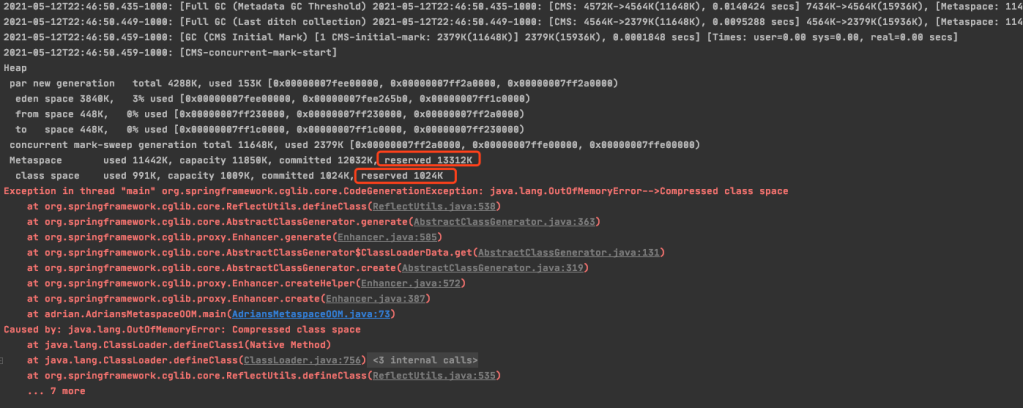
Sample screenshot with VM Option: -Xms15M -Xmx15M -XX:+DisableExplicitGC -XX:+UseConcMarkSweepGC -XX:MaxMetaspaceSize=15M -XX:MetaspaceSize=15M -XX:CompressedClassSpaceSize=1M -XX:+PrintGCDetails -XX:+PrintGCDateStamps

If you compare this screenshot with other screenshots in this article without XX:CompressedClassSpaceSize parameter, we will find the differences are the reserved size and limited of the Compressed class OOM.

Spring Cloud Netflix Eureka for microservice registration and discovery

This page introduces how to use Spring Cloud Netflix Eureka to for microservice registration and discovery.

Official repository: https://github.com/Netflix/eureka

Background

In the past, it is common that invocation between components was implemented in a manner of having a standardized and constrained interface between each party. However, when it comes to the microservices era, the state of microservice instances are more dynamic compared to those of traditional application. For example, the IP and numbers of instances would change over time. Therefore, we will need a centralized component to handle microservice registration and discovery and Eureka is one of the most popular components in this case.

How it works

Two main parties: server(s) and client(s)

Client feature
  1. Registry: when client service starts, it will register its information, such as address, to the server’s registry list;
  2. List pulling: the client will pull the registry list from the registry centre and caching in the client side;
  3. Heart beat: by default, the client have a mechanism to notify its alive state to registry centre every 30 seconds. This time period can be changed;
  4. Invocation: the client gets the mapping between services’ name and their real addresses from the registry list and invoke those services.
Server feature
  1. Service Registry and Discovery: records each microservice’ information, such as IP, port and service name, etc; allow clients to fetch registry list and discover other microservices;
  2. API Operations: offers APIs for clients to operate, including service registration, getting instances’ information, etc. (https://github.com/Netflix/eureka/wiki/Eureka-REST-operations);
  3. Health check: checks registered services regularly and removes those inaccessible microservices in a designated time(by default, it’s 90 seconds).

How to use

We will have two Eureka servers here. In the latter section we will have its synchronization discussion.

Server
  1. pom.xml
<dependency>
            <groupId>org.springframework.cloud</groupId>
            <artifactId>spring-cloud-starter-netflix-eureka-server</artifactId>
</dependency>

2. Application Properties

application.properties

spring.application.name=eureka-server

spring.profiles.active=euk1

eureka.client.register-with-eureka=true
eureka.client.fetch-registry=true

application-euk1.properties

eureka.instance.hostname=euk1
eureka.client.service-url.defaultZone=http://euk2:8002/eureka/
server.port=8001

application-euk2.properties

eureka.instance.hostname=euk2
eureka.client.service-url.defaultZone=http://euk1:8001/eureka/
server.port=8002

3. Enable it in the Application entrance

@EnableEurekaServer
@SpringBootApplication
public class EurekaServerApplication {
    public static void main(String[] args) {
        SpringApplication.run(EurekaServerApplication.class, args);
    }
}
Client

1. pom.xml

<dependency>
            <groupId>org.springframework.cloud</groupId>
            <artifactId>spring-cloud-starter-netflix-eureka-client</artifactId>
</dependency>

2. application.properties

spring.application.name=eureka-consumer
eureka.client.service-url.defaultZone=http://euk1:8001/eureka/, http://euk2:8002/eureka

3. Sample Controller to pull information from the registry centre

@RestController
public class Controller {
    @Autowired
    DiscoveryClient client;

    @Qualifier("eurekaClient")
    @Autowired
    EurekaClient eurekaClient;

    @GetMapping("/getServices")
    public String getServices() {
        List<String> services = client.getServices();
        return String.join(", ", services);
    }

    @GetMapping("/getInstances")
    public Object getInstances() {
        // getInstancesByVipAddress uses the application name as the first input
        List<InstanceInfo> instancesByVipAddress = eurekaClient.getInstancesByVipAddress("eureka-consumer", false);
        List<com.netflix.appinfo.InstanceInfo> instances = null;

        String collect = instancesByVipAddress.stream().map(item -> ToStringBuilder.reflectionToString(item)).collect(Collectors.joining(", "));

        if (instancesByVipAddress.size() > 0) {
            // getInstancesById takes the INSTANCE_IP:APPLICAION_NAME as input, e.g. 10.0.0.2:eureka-consumer
            instances = eurekaClient.getInstancesById(instancesByVipAddress.get(0).getInstanceId());
            instances.forEach(instance -> System.out.println(ToStringBuilder.reflectionToString(instance)));
        }

        return collect;
    }
}

Configuration Explanation

// heartbeat interval, this will change the renewal interval from client to server from the default 30 seconds to 10 seconds
eureka.instance.lease-renewal-interval-in-seconds=10

// each 10 seconds the client will pull service registry information from the server
eureka.client.registry-fetch-interval-seconds=10

// this is the expire time for renewal, the default value is 90 seconds. After this time without renewal interaction from the client, the server will remove the client service from the registry list.
eureka.instance.lease-expiration-duration-in-seconds=60

// register itself to the server, by default it's true
eureka.client.register-with-eureka=true

// fetch information from the server, by default it's true
eureka.client.fetch-registry=true

// this is the instance name, it has to be the same as the hostname other server setting in eureka.client.service-url.defaultZone, otherwise, you will have unavailable service
eureka.instance.hostname=euk1

// the application name, we can treat it like a group name
spring.application.name=eureka-server

// you can specify metadata for clients. For example, specify a value to let client know it's a low spec server so that they can avoid forwarding overloaded traffic to this server.
eureka.instance.metadata-map.speclevel=low

Precautions

  1. Don’t import both the client and server pom dependencies to the same module, otherwise you will encounter some exceptions.

Advance

Other similar products: Nacos, Consul, Zookeeper.

Compare with Zookeeper
  1. Zookeeper is master-slave model while Eureka does not have a leader.
  2. Zookeeper has high data consistency while we don’t want to talk about data consistency with Eureka but rather high availability.
    1. It takes time eureka servers synchronize with each other. (The heart pulling time settings we mentioned above)
    2. Although clients can register to all eureka servers, but the time to complete the registration is different, which is not strong consistency.
    3. However, data consistency is not important here because as long as clients and get one of the service that can do the work, it’s all good.
Cluster modle
  1. Eureka servers also register themselves to other servers(our case mentioned above);
  2. Eureka servers are isolated from others, which they don’t know how many other servers out there. Client services will register themselves to all Eureka servers.
Self-protection mode

Eureka will trigger the self-protection mode if within a minutes there are less than 85% of heart beat packages receive. It would happen because of the networking issue but not necessary services are unavailable so that this mechanism to is avoid removing actually available services from the list simply because of network issue causing heart beat package loss.

we set eureka.server.enable-self-preservation = true to disable this mechanism, but it is not recommended to disable it.

What is healthcheck.enabled for?
We can set eureka.client.healthcheck.enabled=true to enable clients to send the real health status of their services to eureka servers.
Only having the heart beat to maintain services' health status are not enough for certain scenario. The heart beat only indicates clients are still accessible but not necessary service-level available. For example, a service has reached to a daily rate of limit to perform specific actions, like selling products, or catch exceptions which causes it no long work properly.