Technology empowers business. Most Internet companies are Business-Outcome-Driven Enterprise, where business determines the technology adoption, architecture adoption, and service boundaries. Most projects on the market cannot reflect the professionalism of software architecture design. We need a practical methodology to solve this problem, and DDD is an ideal formula.
DDD is a software architecture design methodology that facilitates engineers/architects to understand the business better and design tech solutions that satisfy changing business requirements. I’m about to write a series of blog articles to elaborate on this methodology. These articles cover architectural decision dilemmas, common misunderstandings about DDD, how we address these problems, DDD basic concepts, elaborate on the pros and cons of various architecture in detail, architecture design that complies with DDD practice, etc.
Why do docker containers get kill frequently with lower heap usage?
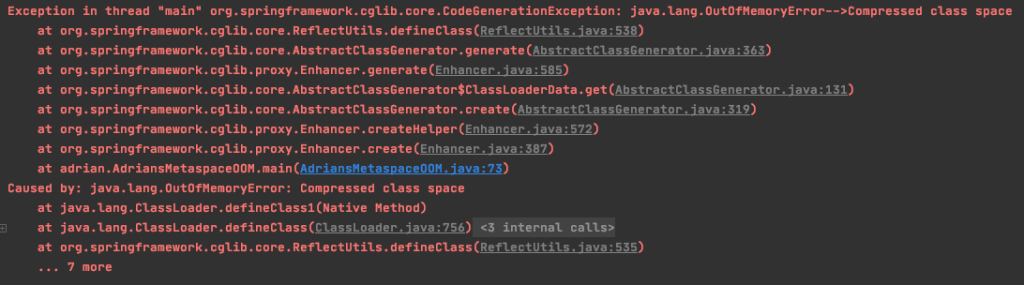
How does Compressed class space and Metaspace OOM occur?
Why do FGCs occur frequently during the early application start phase?
Do you really understand the -XX:MetaspaceSize parameter?
When it comes to JVM tuning and OOM trouble shooting, there are some common misunderstanding regarding Metaspace. This article will address these questions step by step.
What is Metaspace?
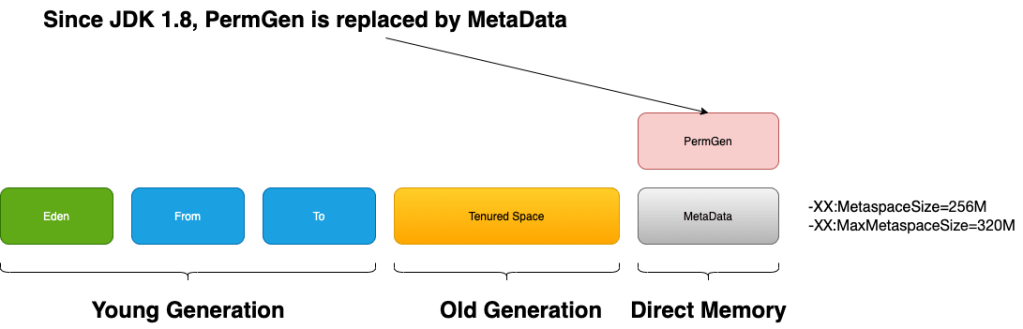
Metaspace in the JVM run-time data area is for storing classes’ information, using direct memory outside the heap.
Before JDK 8, it was the PermGen in the heap serves for the similar purpose. Since JDK 8, Metaspace replaces PermGen, and it lives outside the heap and uses direct memory.
String constants are stored in heap in JDK 8.
It has two parts: Klass Metaspace and Non-Klass Metaspace
Klass Metaspace
We can take klass as the internal run-time data structure of our Java class in JVM.
The -XX:CompressedClassSpaceSize is used to specify the max size of this region. The default value for this parameter is 1G. If the UseCompressedOops parameter is disabled, there is no Klass metaspace and its data will be stored on the Non-Klass Metaspace. If your -Xmx is bigger than 32G, UseCompressedOops is disabled by default.
If the memory usage in this region reaches to the specified CompressedClassSpaceSize and the application still requires to allocate more memory, Full GC will occur. If the FGCs can’t release some memory for usage, then the JVM will complain java.lang.OutOfMemoryError: Compressed class space and application crash.
Non-Klass Metaspace
The Non-klass Metaspace stores klass-related metadata, such as method, constant pool, etc.
Why do docker containers get kill frequently with lower application heap usage?
One of the typical cause of this problem is the growth of metaspace.
As I mentioned above, the metaspace uses direct memory. If we haven’t specify the MaxMetaspaceSize flag, the metaspace size can grow till the physical memory size.
If your application code is not robust enough or uses some buggy third-party code, having a large amount of constant and using dynamic class loading, it would cause the overwhelming constant pool. Overtime, it could exhaust all your physical memory resulting in killing the docker container or killing other processes that running in the same production machine.
Solution: set -XX:MaxMetaspaceSize
With the MaxMetaspaceSize set, we have better resource isolation in production environment(at least in the direct memory aspect).
When the direct memory usage in metaspace reaches to the maximum value, if the FGCs can release some memory then your application can continue after certain STWs, if it can’t release some memory, then it will result in java.lang.OutOfMemoryError: Metaspace.
We can use -XX:+HeapDumpOnOutOfMemoryError to dump the heap for trouble shooting.
Even we have one application crash in the worst scenario, it is still better than killing other applications in the same machine.
Why do FGCs occur frequently during early application start phrase and how is it related to MetaspaceSize?
If we haven’t set the -XX:MetaspaceSize parameter, its default value is around 21M.
Some articles take this parameter as the size of the Metaspace, and this is wrong.
It is the metaspace’s initial high water mark(HWM).
The HWM of metaspace will shrink or grow according to the information collect by the VM. Internally, it is controlled by the capacity_until_GC in metaspace’s implementation.
For experiment, I wrote a small program with non-stop dynamic class loading starting with the following VM options(-Xms200M -Xmx200M -XX:+DisableExplicitGC -XX:+UseConcMarkSweepGC -XX:MaxMetaspaceSize=200M -XX:+PrintGCDetails -XX:+PrintGCTimeStamps)
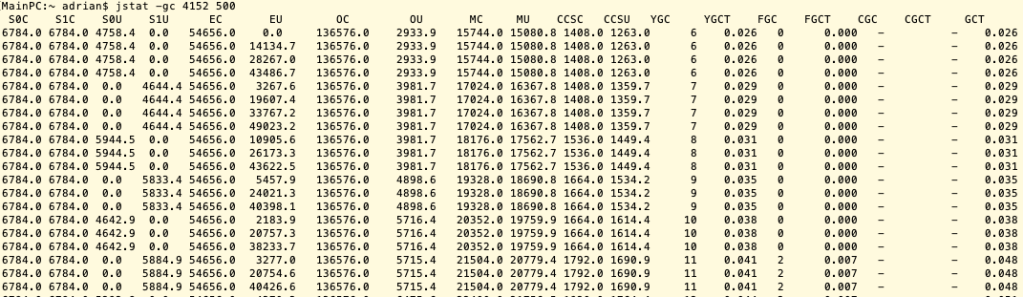
When the metaspace memory usage reaches to the HWM, it will cause FGC and the HWM will increase. Here are some of the GC data captured by jstat:
jstat -gc 4152 500
When the MU(Metaspace utilization) reached to around 21M, the CMS FGC was triggered.
When the MU reached to around 35M, the next CMS FGC was triggered.
Then the next CMS FGC happened at around 60M MU.
The next one occurred at around 100M MU.
Then around 170M MU
And then metaspace OOM
From the above experiment, it is obvious that the we will experience several FGCs for an application initially only needs around 200M MC(metaspace capacity). This is costly.
Improvement: set the initial HWM to a high value with -XX:MetaspaceSize
Should we set this value same as -XX:MaxMetaspaceSize?
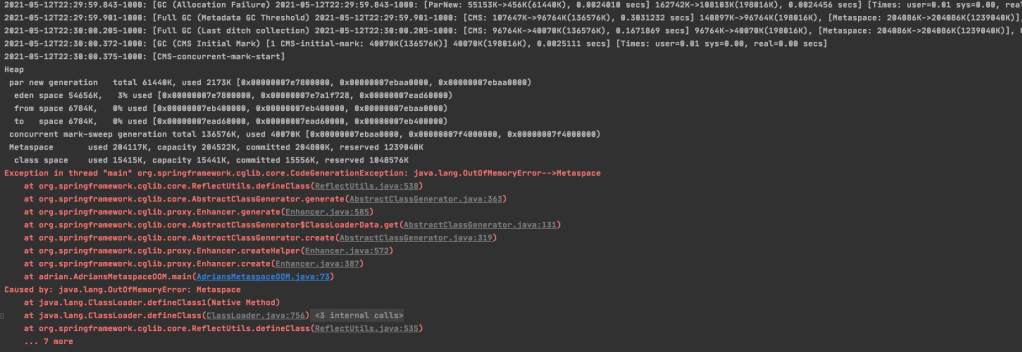
Let’s take a look at the following experiment:
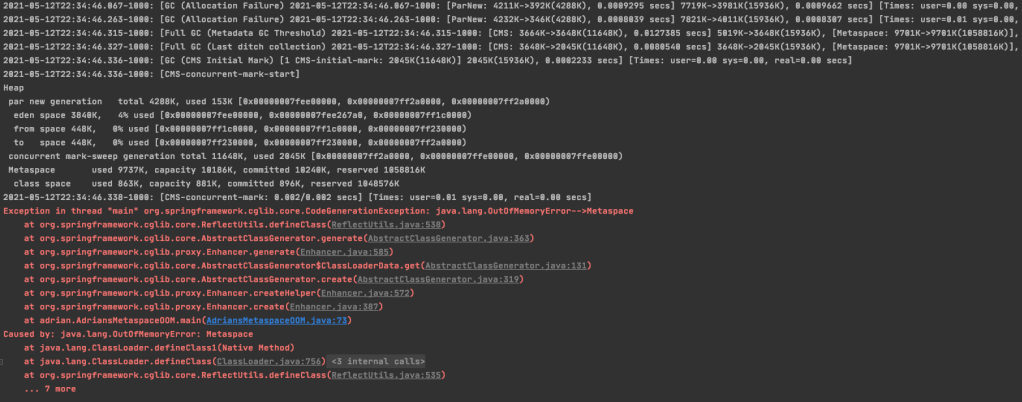
Experiment 1Same MetaspaceSize and MaxMetaspaceSize with VM Option: -Xms15M -Xmx15M -XX:+DisableExplicitGC -XX:+UseConcMarkSweepGC -XX:MaxMetaspaceSize=10M -XX:MetaspaceSize=10M -XX:+PrintGCDetails -XX:+PrintGCDateStamps
The CMS FGC started but at the CMS-concurrent-mark phrase the application crash with OOM.
Experiment 2 Leave some room between MetaspaceSize and MaxMetaspaceSize with VM Option: -Xms15M -Xmx15M -XX:+DisableExplicitGC -XX:+UseConcMarkSweepGC -XX:MaxMetaspaceSize=12M -XX:MetaspaceSize=10M -XX:+PrintGCDetails -XX:+PrintGCDateStamps
From the above screenshot, we can see there’s one CMS FGC finished before the final application crash. The application crashed here before I deliberately keep adding unreleasable class to the metaspace. Therefore, in the real practise if the CMS FGC finished before the final crash can release some memory space for the metaspace, then we give the chance for the application to continue to work without crash.
Conclusion for the MetaspaceSize parameter:
Set this parameter with a value high enough to reduce the FGC overhead of HWM expansion;
Leave some room between the MetaspaceSize and MaxMetaspaceSize so that the CMS FGC have a chance to save the application from crash.
Should we set –XX:CompressedClassSpaceSize if we set -XX:MaxMetaspaceSize?
The answer is no, because it only provide the extra feature to limit the kclass region size and change the reserved in both Metaspace and the class space.
The reserved is the virtual memory not the physical memory.
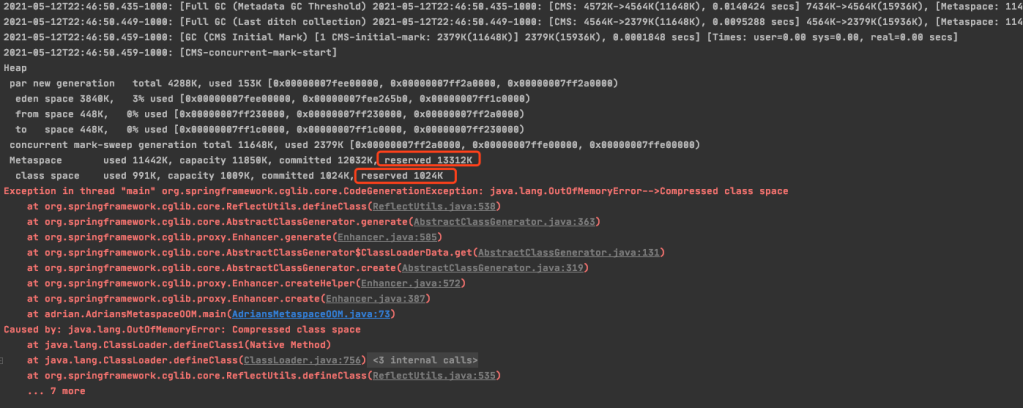
Sample screenshot with VM Option: -Xms15M -Xmx15M -XX:+DisableExplicitGC -XX:+UseConcMarkSweepGC -XX:MaxMetaspaceSize=15M -XX:MetaspaceSize=15M -XX:CompressedClassSpaceSize=1M -XX:+PrintGCDetails -XX:+PrintGCDateStamps
If you compare this screenshot with other screenshots in this article without XX:CompressedClassSpaceSize parameter, we will find the differences are the reserved size and limited of the Compressed class OOM.






 Adrian's Blog